Honeywell Security Connect
Verified contacts
Taken from the company's own website and checked on 2026-08-25. Companies change these — if something does not match, the official site wins.
- Phone
- 1-800-582-4263
- Phone
- 1-704-627-6200
Support hours: 24/7
Official website: honeywell.com
Be the first to rate this page
Log into your Honeywell Total Connect online account details at www.mytotalconnect.com. Give your family the best security they can have against burglars and unwanted events at your home. Keep your family members safe by providing them with utmost protection. The security services offered by the company is energy saving and gives you real time monitoring anytime and anywhere.
The mytotalconnect.com online site allows you to manage the security alarms set in your homes. Set your locks that you can control remotely from anywhere. You can also switch on or off your alarm systems with the use of your devices that have an internet connection. Set your lights that they turn on minutes before you arrive home or turn off minutes after you are in bed. The system is totally programmable so that it is easier for you to activate your alarms for your safety.
MyTotalConnect Honeywell Security Features
- Track your vehicles and assets with the use of GPS.
- Save considerable amount of energy by controlling the thermostat of your home
- Home automation and voice commands
- Manage your door locks wherever you may be
- Set your lightings even if you are not at home through your smart devices
- View real time video streaming on up to six cameras installed in your home
- Determine the current condition of your pets for protection
How to Sign in with your Honeywell Security Online Account
Existing members can get access with the online security system using their log in details. Click the link that will lead you to log in your account. You will be prompted with an option to choose for the kind of software you use for your smart devices. You are to select between version one or version two. Then, enter your valid username and your unique password. Manage your home security devices so that you can control them even if you are far away from your house. You do not have to be bothered about the safety of your home at all.
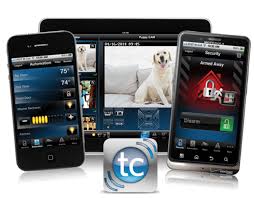
Enjoy the benefits of keeping your house or business properties protected with my total connect security services. The ability to operate your alarms with the remote control system gives you the confidence that your building or your house is all in good state. You can do other activities while not being worried about the security status of your home. You can receive alerts and other notifications through your email as long as it is constantly connected to the site. You can check the live videos of your home at any computer that streams images from your security cameras. Be assured that you can check the safety of your family as well as your home from time to time.
Find the right security portal
Start at honeywell.com if you are unsure which Honeywell security portal belongs to your system. Look for the product or service name on the alarm panel, welcome email, installer paperwork, or account notice. Similar names do not always lead to the same account system.
If a saved security login page suddenly looks different, do not enter your password yet. Close it and return through the company site. Check that the page shows the service name you expected and that your browser does not display a security warning.
Your home security account may have been created by the alarm dealer or installer. If the portal says no account exists, try the email address used when service was arranged. Do not create a second account unless the installer or customer service tells you to do so.
Security codes and sign-in problems
A security code requested during sign-in is usually different from the code used to arm or disarm an alarm panel. Read the prompt before entering anything. Never send an alarm code, password, or one-time sign-in code to someone who contacts you unexpectedly.
If a one-time code does not arrive:
- Confirm that the masked email address or phone digits belong to you.
- Wait for the newest message and use only its most recent code.
- Check blocked messages and spam folders.
- Make sure your phone has a signal and its date and time are set correctly.
- Restart password recovery instead of repeatedly guessing.
If you lost access to the listed email address or phone, use the account-recovery option. Be ready to identify the account holder, service location, alarm company or installer, and the device shown on the account. Do not post those details in a public forum.
Reach security customer service
I cannot connect a call from this page. To reach customer service, open honeywell.com, identify your security product, and choose its support or contact option. Your alarm dealer or monitoring provider may control account access, so check the name on your service paperwork or panel label if Honeywell support cannot find the account.
Before contacting support, have the account email, service address, panel or device model, installer name, and the exact error message ready. Do not share your password or an active verification code.
Activate a Connect card safely
Do not assume that a card labeled “Connect” belongs to Honeywell Security. Read the card for the issuing company and activation instructions. If it is an account-registration card supplied with the security system, use only the verified portal named in the accompanying paperwork or ask the installer to confirm where its code belongs.
If it is a payment, benefit, access, or gift card from another issuer, activation must be handled by that issuer. Do not enter its number or security code into a Honeywell security login.
Was this page helpful?
Be the first to rate this page