AchieveCard Visa Prepaid Card Review
Be the first to rate this page
AchieveCard Visa Prepaid Card
Signup or activate this prepaid card and start enjoying all the benefits.
How Do I Apply for the AchieveCard Visa Prepaid Card?
Applying for an AchieveCard Visa prepaid card is easy. We will explain all the benefits of getting the card below. To apply now just visit www.AchieveCard.com
Why Is It Smart To Apply For The AchieveCard?
1. One reason is that you get paid faster than a paper check. When you setup direct deposit with your new AchieveCard you will never have to worry about a paper check again. When the weather is bad in other states, it can delay you getting your check. Don’t ever take the chance when you can get it put directly into your account where it is ready for use on your card.
2. Signing up is quick and easy. It only takes a few minutes to apply and get your new prepaid card.
3. There is also no minimum balance to worry about.
How Can I Use The AchieveCard?
This prepaid Visa card can really come in handy when shopping online. Shopping on Amazon or other online shops is convenient and safe. You can also use it to pay bills and make everyday purchases. It is instant money, yet way safer than carrying around cash in your wallet.
Can I Pay Bills Online?
This is one of the best features of getting the AchieveCard. With this prepaid card you can stop writing out checks and simplify your process. Use the online bill pay feature to pay all your bills. This includes sending money direct to an individual through a paper check. When you setup your payees on online bill pay, checks are automatically sent out. AchieveCard prints and mails them for you for free.
Do They Have A Loyalty Program?
Yes, there is an exclusive Achieve Rewards Loyalty program. Once you sign up the loyalty program will let you earn exclusive AchieveRewards. This is unique to this debit card and a nice feature for a prepaid card.
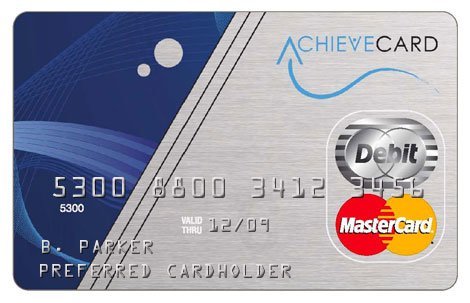
Apply for your AchieveCard today and start enjoying all the cool benefits of this prepaid card. Get your card at www.AchieveCard.com
How do I sign up for online account access?
If you already have an AchieveCard but have never used the online account area, choose the sign-up or registration option at the company’s official website. Do not submit another card application just to create a login.
Have your card and personal details ready. Enter the information exactly as it appears in your card records, create your login details, and complete any identity check shown on the screen.
“Signup,” “sign-up,” “/signup,” and searches such as “signup com login” usually refer to this same registration step. If you already created online credentials, use the sign-in option instead.
- If the site says your information does not match, check the card number, name, address, and date of birth for typing errors.
- If it says an account already exists, stop registering and use account recovery.
- If a verification message does not arrive, check the contact details you entered and look in the spam folder.
How do I log in to my AchieveCard account?
Open the company’s official website, select the account sign-in option, and enter the username and password you created during registration. A signup page and a login page serve different purposes: signup creates online access, while login returns you to an existing account.
If your password is rejected, use the password-reset option instead of making a second profile. Enter the requested account details and follow the recovery steps. Repeated guesses can make access harder, so pause if the page warns that the account is locked.
If the page will not load, confirm that you have a working connection, close and reopen the browser, and try again. Avoid search ads or unfamiliar pages asking for card details.
How do I activate my AchieveCard?
First check the card carrier, sticker, or welcome material for the official activation instructions. Depending on the instructions supplied with your card, activation may be offered online or through an automated phone process.
- Keep the physical card nearby.
- Enter the card and identity details requested by the official activation process.
- Create or confirm any security information when prompted.
- Wait for a clear activation confirmation before trying the card.
If online activation fails, recheck every digit and make sure you are using the details tied to the card account. A card that is already active, has not been registered correctly, or cannot be verified may require customer support.
Where can I find the activation phone number and support hours?
Use the customer-service number printed on the back of the card or included with its paperwork. This is safer than relying on a number copied from an old search result. Follow the prompts for activation or for a representative.
Support availability can change. Check the current hours shown in the official account area or listen to the recorded message when you call. Have the card and identifying information ready, but never give a password or security code to someone who contacted you unexpectedly.
Was this page helpful?
Be the first to rate this page