Capstone Interactive eBooks
Be the first to rate this page
Manage your Capstone online account and browse through a wide array of learning services via www.mycapstonelibrary.com. This is a perfect site for interactive learning and an enhanced reading experience to be nurtured. Choose from the different genres of books and start your learning supplementation through an interactive program.
Check with your school administrator if you have your own student account. This will be used when you log in to mycapstonelibrary.com. You can add e-book into your reading devices with the use of your account. You can select from the different subjects and titles of the books you want to read for learning and for entertainment. You just need your username provided by your school admin and your unique password to get access into the library. The Capstone Interactive eBooks provide reading tools that you can use for your study sessions like: highlight a text, audio reading, and graphical story books for visual learning among other great features.
Benefits of MyCapstoneLibrary
Invest for a great future for your child by giving an explicit learning experience through reading. There are over 5,000 book titles you can select that are applicable to the level of reading of your children. Purchase these e-books with prices that vary according to the topics and book title which starts at .99 each. They can experience fun while learning through the interactive way that my capstone library is providing the readers. Kids will love the reading experience they can get from these electronic books. It features clear audio reading that are accompanied with highlighted text which children can read along to. This is one way for reluctant readers to embrace a love for books accompanied with the graphical features of the literature for much fun comprehensive reading encounter.
Order the books through my capstone library online. You are to enter your user ID as well as your password to process your orders. There are available packages you might be interested with. Dial the numbers 1-800-747-4992 that will direct you to a customer service agent to discuss these subscription packages the library is offering their members.
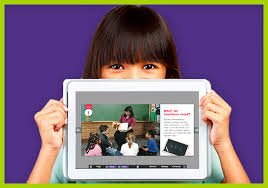
The Capstone e-books are readable in library computers with working reading applications. Students can access them on their internet devices like tablets, smartphones, and iPads among others. You can also read different kind of books offline. You just have to download the material into your device while you are still connected to the internet.
How to check whether your Capstone account is active
Open the company’s official website and try to sign in with the account details issued by your school or library. If the account opens normally, it is active. An error does not always mean the account has been deactivated. First check for typing mistakes, unwanted spaces, and capital letters. If possible, enter the details manually instead of using information saved by your phone.
If the same details fail on another browser or device, ask the school or library staff member who manages access to check the account status. Have the student’s name, school or library name, and the exact error message ready. Do not send a password by email or include it in a support request.
A missing title or blocked feature is not, by itself, proof that the whole account is inactive. Access can differ by institution and by the collection assigned to the user.
How to check whether a card or number is active
Capstone account access and payment-card activation are separate issues. The Capstone sign-in screen cannot confirm whether a debit, credit, prepaid, or gift card is active. It also cannot check whether a mobile number is active.
For a payment or gift card, use the card issuer’s official app or the issuer information printed on the card or its packaging. Look for an activation or card-status option. You may be asked for card details and an identity check. If the card is declined, confirm that it was activated, that the entered details match the card, and that the issuer has not placed a security restriction on it.
For a phone number, test whether it can place a call or receive a text, then check its status with the mobile carrier. Do not enter card or phone details into an unfamiliar “active card checker” or “active number checker.” Such third-party tools cannot reliably confirm account status and may collect sensitive information.
Checks and checkbook account numbers
A checkbook is managed by your bank or credit union, not through a Capstone account. On a standard U.S. paper check, the check number is usually printed near the upper-right corner and may also appear in the number line along the bottom. The routing number and account number are also in that bottom line, but their order can vary. Compare the printed numbers with the labels in your bank’s official app or ask the bank to identify them.
Do not use the check number to decide whether a checking account is active. A check number identifies one check, not the status of the account. To confirm account status or order checks, contact the bank through its official app or the contact information on a bank statement. Keep full account and routing numbers out of messages to Capstone support.
Finding current customer support availability
Support hours and contact options can change. Check the company’s official website for the current support or contact area rather than relying on an old directory entry. If live help is unavailable, save the exact error text and note the device and browser used. School-managed access problems should normally go to the school or library administrator first; card, checkbook, and phone-number problems belong with the relevant issuer, bank, or carrier.
Was this page helpful?
Be the first to rate this page