Florida Department Of Revenue
Be the first to rate this page
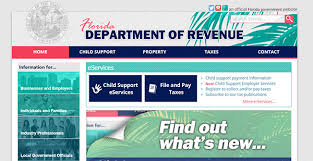
If you are a Florida resident, an online Department of Revenue has been developed for your convenience and you can access it through www.myflorida.com/dor. The Florida Department of Revenue website offers services for child support, properties, taxes and so much more.
To attain a higher level of voluntary compliance, the Florida Department of Revenue or DOR, is an agency that is responsible and accessible to the people of Florida and delivers a just and efficient taxation and child support programs. Serving its people with utmost respect, great concern and professionalism, it is the goal of myflorida.com/dor to develop tax laws and a child support system that are easy and comprehensible.
Navigating MyFlorida/DOR
My Florida also offers links to information and resources which includes forms and publications, news releases, open government and public records, public meetings, Q’s and A’s, regulatory plans, surveys, emergency and disaster information, report tax violators/reward program, tax incentives for business, Florida minimum wage, internal revenue services and more.
If you are a parent who wants to make payments for child support, you can pay online using your electronic check or your credit card. You can access your case information using the e-services and learn on how to apply for child support services. Contact Florida DOR customer service by dialing 1-800-622-5437 Monday – Friday from 7:30 a.m. to 6 p.m. EST. They are always ready to answer all of your questions. You can also update your employment status, address and other personal information just by calling their customer service hotline.
For child support disbursement, an automated information message is made available to you when you contact them at 1-877-769-0251 Monday – Friday 8 a.m. to 6 p.m. EST. Payment information provided includes the following: The Date of Payment, Number of recent Payments with its respective payment amounts, Deposit Information for your FL debit MasterCard, Report your Stolen or Lost checks, Request to Cease Payments and Change Address.
How to find the correct department login
Start at the company’s official website and choose the program connected to your account. The department portal is not one shared login for every service. Tax accounts, child support cases, and other department services may use different sign-in screens.
Before signing in, have the email address or username used when the account was created. You may also need information from a recent department notice to identify the correct account or program.
- Open the department’s main page.
- Select the service you need.
- Choose the sign-in or account access option shown for that service.
- Check the service name before entering your password.
If you saved an old portal page, begin again from the main site. A bookmark can lead to a retired page or to the login for a different department program.
If the department portal will not let you sign in
First, check for a typing error and make sure your phone did not add a space after the username. If the page offers a password reset, use it once and wait for the message before requesting another. Several requests can leave you trying an older reset message that no longer works.
If no reset message arrives, check spam or junk mail and confirm that you are looking at the inbox connected to the account. Do not create a second account unless the portal specifically tells you to do so. A duplicate account can make it harder to match your records.
When the portal reports that it cannot find your information, return to the program selection page and confirm that you chose the correct service. If you still need help, note the exact error message, the service name, and the time the problem occurred. Do not send a password or full sensitive identification number in an ordinary email.
How to check whether a department office or help service is open
Department hours can depend on the program, the type of help needed, and whether you are contacting a local office or a statewide service. Holiday closures and emergency changes may also affect availability.
Use the official contact or office information for the specific program before making a trip. Check that the listing names the service you need, since a nearby office may not handle every department matter.
If live help is closed, you can prepare for the next contact. Keep your case or account reference, a recent notice, the date of the transaction or problem, and a short description of what you need. Avoid carrying more personal records than the office instructions require.
An online portal being available does not mean staff are currently available to answer questions. Likewise, a general office being open does not guarantee that a specialist for your issue is available. Check both the office status and the contact details for your program.
Was this page helpful?
Be the first to rate this page