Payroll Prepaid Discover Card
Verified contacts
Taken from the company's own website and checked on 2026-08-25. Companies change these — if something does not match, the official site wins.
- Phone
- 1-800-347-2683
Support hours: 24/7
Official website: discover.com
Be the first to rate this page
If you want a quick, reliable, secure and convenient way to manage your funds, access Your payroll card through www.itsmypayroll.com. You can manage your account by simply entering your Card number and Access Code and clicking the “Login” button. ITS is a platform for you to manage your funds in the most efficient and convenient way possible.
The card issued by itsmypayroll.com can be use from the convenience of your home, through online shopping and paying bill, or use it to pay for your grocery and even pay for your gas by using it anywhere Discover cards are accepted. The online account will allow you to access your current balance, transaction activity and so much more. If you have a new card, activation starts when you click the “Click here to Activate!” link on the page.
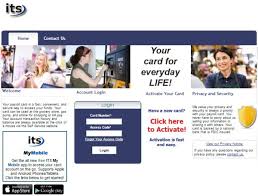
Activation Process on ItsMyPayroll
Enter your card number into the designated box to begin the activation. Once your activation process is complete, you can then use your prepaid debit at your convenience for online transactions, grocery and anywhere Discover card is accepted. You can also manage and track your account status online using its my payroll.
Payroll card Features
- Moneyless transactions for every day purchases.
- ATM cash withdrawal (In-networks ATMs only)
- Online fund transfer
- Mailed paper check upon request through Bill Pay.
Your security and privacy is Its My Payroll’s top priority. The card issued is backed by Central National Bank which is a member of FDIC. For more information related to your card and or your account, click the “Contact Us” button on the menu bar in which you will be asked to enter your name, preferred method of contact, email Address or phone number, and your message. Make sure not to enter sensitive information such as your account number or SSN in your message. You can also contact customer service by calling this phone number 1-866-977-3974 or email directly at [email protected]. Send mail to this address: Prepaid Card Central National Bank PO Box 3003 Enid, OK 73702.
How to sign a check over to someone else
First ask the receiving bank, credit union, or check-cashing location whether it accepts third-party checks. Many do not, and rules can vary by account. Do not write on the check until the recipient confirms where it can be deposited or cashed.
If it is accepted, turn the check over and use the endorsement area:
- Write “Pay to the order of” followed by the recipient’s full legal name.
- Sign your name exactly as it appears on the front of the check.
- Have the recipient sign beneath your signature when the receiving institution instructs them to do so.
Both people may need to appear in person with current photo identification. Bring the check without extra marks or corrections. A name mismatch, damaged check, missing identification, or endorsement outside the marked area may cause a rejection. If the institution will not accept the signed-over check, ask the original payer to issue a replacement directly to the intended recipient.
How to call Discover customer service
For help with a payroll prepaid card, start with the customer-service information printed on the back of that card. A card carrying the Discover network mark may be managed by a different issuer, so general Discover support may not have access to the payroll account.
Before calling, have the card, your name, and details of the problem ready. Use the automated menu to report the card type and reason for calling. Never give a caller your full access code, online password, or one-time security code.
Customer-service hours can differ by department and may change. Check the current hours on discover.com or listen to the recorded message before waiting for an agent. If the card is lost, stolen, or showing a transaction you do not recognize, choose the urgent card or fraud option rather than a general account question.
Balance, card status, tracking, and nearby service
To check a Discover-branded gift card balance, use the balance instructions printed on the card or its packaging. Look for the issuer’s name and use that issuer’s official balance service. A payroll card account and a separate gift card are not interchangeable. If the card has no readable issuer information, contact the business that provided it.
For the status of a new or replacement payroll card, contact the card issuer. Have your request date and mailing ZIP code ready. Ask whether the card was produced, mailed, returned, or replaced. A tracking number may not exist for every delivery method; if one was assigned, the issuer can tell you how to obtain it. Do not post a tracking number or card details in a public message.
For “Discover near me,” decide what you need before searching: an ATM, a bank that will handle a check, or a store that accepts the card. Use the locator provided by the card issuer or Discover on discover.com, enter your current ZIP code, and call the location before traveling if you need a specific service. An ATM displaying the network mark may still have different withdrawal rules, while a nearby bank may decline checks for noncustomers or third-party checks.
Was this page helpful?
Be the first to rate this page